Product
We got the TradingView Advanced Charts licence
Jordan Ellis
Senior Product Marketing Manager, CoinBeacon
We applied for TradingView’s Advanced Charts licence, and we were approved. The full charting terminal is now live at CoinBeacon, on six exchange order books, free and without an account.
What changed
CoinBeacon has always drawn its charts with TradingView technology: every board, every thumbnail and the classic terminal are rendered with Lightweight Charts, the open-source library TradingView publishes. What we did not have was the full product: the drawing tools, the studies library, the symbol search, the chart layout most traders already know from TradingView itself.
That is now live. A second charting engine sits alongside the existing one, and you can switch between them from either page. Nothing was taken away to make room for it.
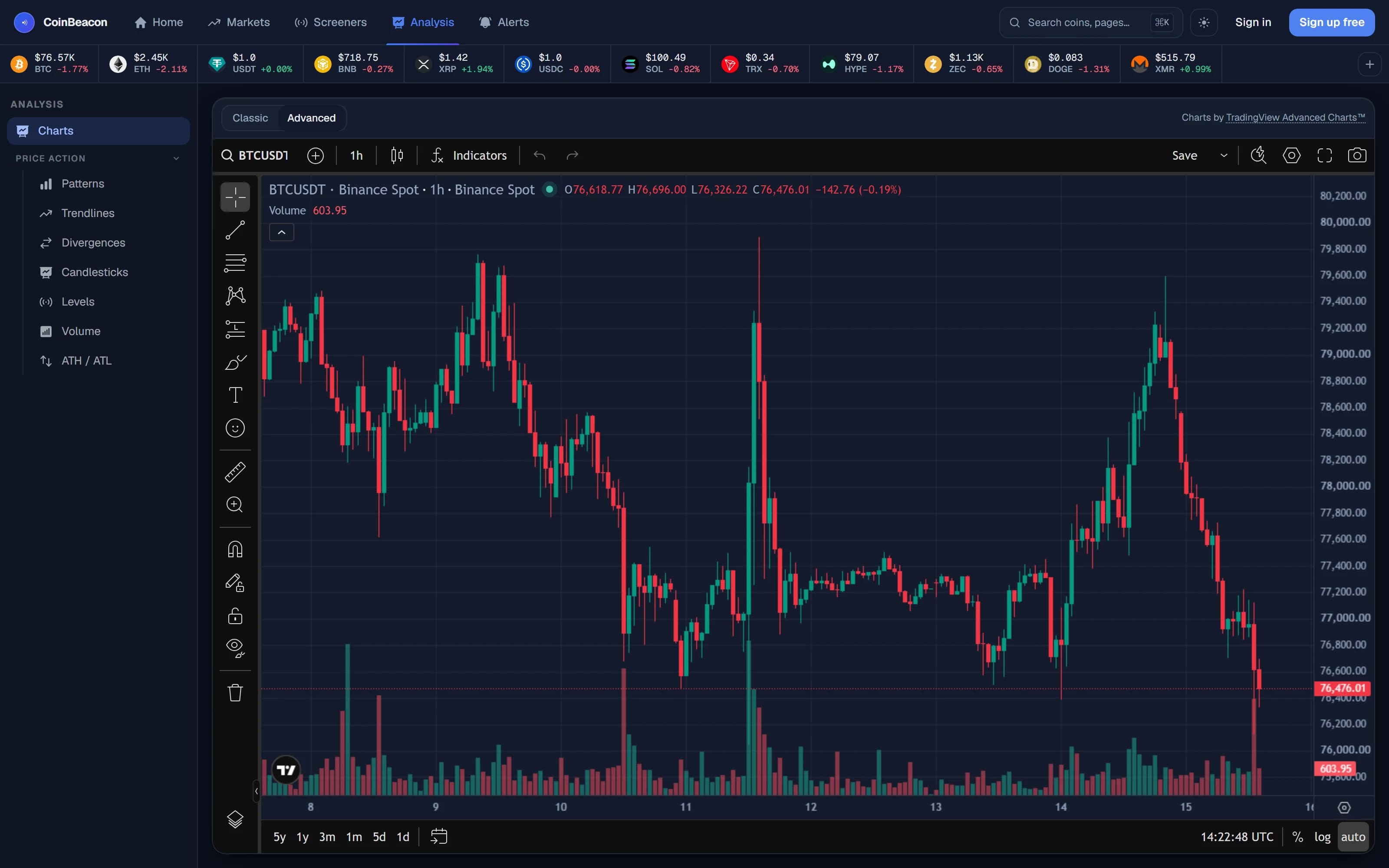
It runs on our data, not a widget feed
This is the part that took the work. TradingView’s Advanced Charts is a renderer, not a data source: it asks a datafeed for candles and draws whatever comes back. The feed behind it here is our own (the same pipeline that runs the alerts, the screeners and the detectors), so the candles you see on the terminal are the candles the product actually reasons about.
Binance spot and futures, Bybit, OKX, Gate.io and HTX futures: six order books, each charted as its own market, across nine timeframes: 1m, 3m, 5m, 15m, 30m, 1h, 4h, 1D, 1W. The venue is named on every search result, because BTCUSDT on a spot book and BTCUSDT on a perpetual are not the same instrument and should never be shown as if they were.
One quiet fix shipped with it: the price axis now uses each venue’s real tick size, read from the exchange’s own instrument definition, instead of guessing the number of decimals from the last price. A perpetual quoted in whole cents and a spot pair quoted to eight decimals now each read correctly.
What you get
- The drawing toolbar comes across whole. Trendlines, channels, Fibonacci tools, position boxes, text and measurements: the same set TradingView ships, not a subset we reimplemented.
- The studies library is TradingView’s own. Every indicator in the standard library, configured the way the platform configures them.
- Symbol search names the venue. BTCUSDT on a spot book and BTCUSDT on a perpetual are not the same instrument, and the search result says which one you are opening.
- The chart settings are the platform’s. Timezone, session, price scale and theme. We did not rebuild the preferences panel and we did not trim it.
How live it is depends on the venue, and we would rather set that out than let you assume:
- Binance streams. Signed in, on Binance spot or futures, the chart is on a live socket.
- Everywhere else polls. The newest candle is refreshed by polling. It is close to live, but it is not a tick feed, and we would rather say so than let you assume otherwise.
The classic chart is not going anywhere
- Twelve indicator toggles stay one click away. The classic chart keeps its own overlay row; nothing moved behind a menu.
- One-second candles are still Binance spot only. That resolution never existed on the other venues, and the new terminal does not change it.
- The detector overlays still draw on the classic chart. Trendlines, chart patterns, candlestick patterns, support and resistance levels, drawn from our own analysis, with no equivalent in an off-the-shelf charting library.
The pattern boards and the coin pages keep rendering with Lightweight Charts, which is the right tool for painting a hundred small charts on one screen. Two engines, one set of markets, one URL shape: a link to a chart works in either.
Free, and staying free
The Advanced Charts terminal is open to everyone, including visitors who have never signed up. No paywall, no trial, no “pro” tier hiding the drawing tools. It is also a condition of the licence.